> ## Documentation Index
> Fetch the complete documentation index at: https://docs.argil.ai/llms.txt
> Use this file to discover all available pages before exploring further.
# Avatar actions
> You can now create your own medias and videos with VEO3 or Hailuo directly integrated into Argil using your own avatars or Argil's licensed avatars. It also integrates Nano Banana.
Fictions allow you to fully prompt 8 second-clips using the latest AI video models with a frame of reference. It will also apply the voice you picked.
## **Video tutorial (text tutorial below)**
## How to create a Fiction video?
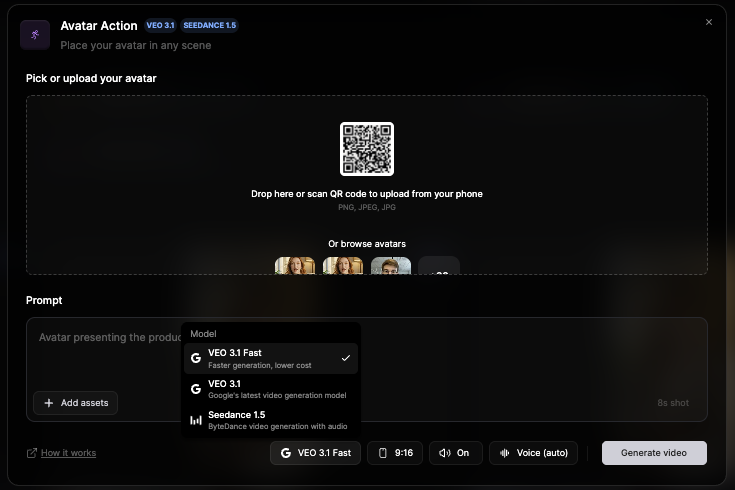
You can put in any picture of your choice or pick from the list of avatars from the platform (your own or Argil's). We will keep the different characteristics of the face being sent so you can be sure the ressemblance stays here!
Using Nano Banana, you can now also add a picture of an outfit or an item. If you are starting from an existing frame, only the outfit will be changed.\
You can add indications in the prompt on how to hold the item.
**Model**: You can pick between Veo3 Fast and Normal. Fast works perfectly fine for simple scenes. For scenes with a lot of people, a lot of cuts going on, Normal will work best.\
**Sound on:** decide if you want to receive a video with sound\
**Selected voice for this video:** if you want your avatar to keep the same voice as usual, pick the voice from the platform. Otherwise, you can delete the voice and let Veo3 pick the voice. \
\
No matter your choice, we will always keep the sound effects.
Regarding the prompting, you can always do a one-liner. \
What we advise you to do is give indications for the following: \
**Advised indications:** Subject, Setting, Actions, Camera and Audio. \
**Bonus indications:** lighting and constraints
The more precise your prompt is, the more likely it is to look as you want.
No need to refer to the image you are using. You can just write the man or the woman (avoid using real names except for scripts and writings on items)
Once a video is generated, hover your mouse over it to see the "Remix" button. It will allow you to reuse the same prompting, same voices and same first frame (that you can decide to delete to start from scratch).
## How to store and reuse those videos?
Each video is automatically stored in the "Assets" section of Argil. They can be used in any video project created on the platform later on using the "play video" icon like shown below.
If you want to reuse those shots in your avatar videos, they will appear in the "assets" tab and saty available in the studio when uploading files.
## Prompt examples
Subject: Person in obvious cardboard robot costume with "HUMAN" written on chest
Setting: Futuristic-looking room with LED lights and screens
Action: Robot-walking stiffly, says in monotone: "As a totally real human, I can confirm Argil is... suspiciously good"
Style/Genre: Absurdist comedy, intentionally bad acting
Camera/Composition: Static shot, slightly low angle for dramatic effect
Lighting/Mood: Dramatic blue and purple sci-fi lighting
Audio: Mechanical voice filter, robotic sound effects, computer beeps
Constraints: Obviously fake robot movements, cardboard clearly visible (no subtitles)
Subject: Skilled anime warrior with spiky hair and determined expression, holding katana
Setting: Japanese dojo courtyard with cherry blossoms falling, golden hour
Action: Sprint-attacking multiple masked opponents, fluid sword movements, acrobatic jumps while shouting: "Through Anime, we explore worlds that reality simply cannot contain!"
Style/Genre: High-energy shounen anime, Dragon Ball Z inspired
Camera/Composition: Fast-paced camera work, dramatic angles, slow-motion sword strikes
Lighting/Mood: Dynamic lighting with anime-style energy auras and impact flashes
Audio: sword clashing
Constraints: Exaggerated anime physics, speed lines, energy effects (no subtitles)
An intense tracking close-up follows a rugged military captain as he strides down a narrow, dimly lit corridor inside a present-day battleship. The camera stays tight on his face and upper torso, capturing every subtle twitch of tension. He's on his phone, jaw tight, eyes scanning the space ahead as flickering emergency lights strobe across his features.
"We need to figure out what the hell is going on, I think it's time to initiate project X" he says, his voice low and urgent, cutting through the ambient hum. Echoing footsteps and distant alarms punctuate the silence, while a faint, tense score builds beneath. The corridor is slick with shadows and gleaming metal, casting realistic reflections and hard edges. The visual style is cinematic realism—gritty and grounded—enhanced by subtle motion blur, soft lens flares from overhead fluorescents, and rich depth of field that isolates the captain from the blurred chaos behind him. The mood is taut and foreboding, every frame steeped in urgency.