> ## Documentation Index
> Fetch the complete documentation index at: https://docs.argil.ai/llms.txt
> Use this file to discover all available pages before exploring further.

# Remove background

> On all the avatars available, including your own. 

<CardGroup cols={2}>
  <Card title="Image Background" icon="image" style={{width: "200px", display: "flex", alignItems: "center"}}>
    Upload jpg, jpeg, or png files
  </Card>

  <Card title="Video Background" icon="video" style={{width: "200px", display: "flex", alignItems: "center"}}>
    Upload mp4 or mov files
  </Card>
</CardGroup>

<Warning>
  Maximum file size: 50 MB
</Warning>

<Steps>
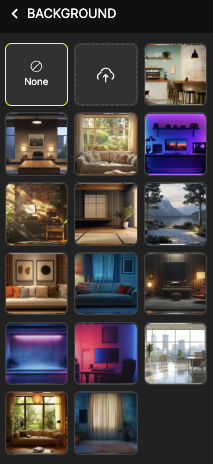
  <Step title="Open background panel">
    Access the background options in the studio
  </Step>

  <Step title="Upload media">
    Choose your image or video file
  </Step>

  <Step title="Apply to specific clip">
    Select clip, upload media, and choose "back" display option
  </Step>
</Steps>

<img src="https://mintcdn.com/argil/-UAhf1yAWS2oQpVh/images/Captured%E2%80%99e%CC%81cran2025-01-02a%CC%8013.45.10.png?fit=max&auto=format&n=-UAhf1yAWS2oQpVh&q=85&s=3ad7e0660df0a63734653e065b0b6419" alt="" width="213" height="464" data-path="images/Captured’écran2025-01-02à13.45.10.png" />
